






Coil Spring Design PDF
Attention! Input results shown will be +/- 10% from middle value. Hint: The closer your min and max inputs are, the more accurate your results will be!
Attention! Input results shown will be +/- 10% from middle value. Hint: The closer your min and max inputs are, the more accurate your results will be!
Attention! Input results shown will be +/- 10% from middle value. Hint: The closer your min and max inputs are, the more accurate your results will be!
Definition: A file in PDF format which provides technical information regarding a specific tension spring design. This may be a blueprint or spring analysis generated on the spring calculator, Spring Creator.
Coil spring design becomes a much easier task when it comes to designing your compression springs at The Spring Store. We provide you with our coil spring calculator, Spring Creator which is able to generate your coil spring’s design in PDF format by providing you with both a blueprint and a full spring analysis. The coil spring analysis will have all sorts of useful information regarding your coil spring design such as spring rate and the elastic limit (maximum travel considering solid height). Spring Creator also gives you the opportunity to email this coil spring design PDF to yourself or an associate as well as request a quote on up to 3 different quantities.
Our coil spring design PDF’s are live blueprints of your compression spring design. Added to the PDF blueprint is the spring analysis which provide you with all of the coil spring’s parameters. You are able to see the compression spring rate, the maximum spring compression, and the maximum safe load. You are also provided with your working loads if you entered them into our interactive calculator before generating the coil spring design PDF blueprint. The working loads section tells you both if your spring will be able to undergo a certain load but also how much travel you can achieve with that load. All of these values are calculated using the physical dimensions of your coil spring design.
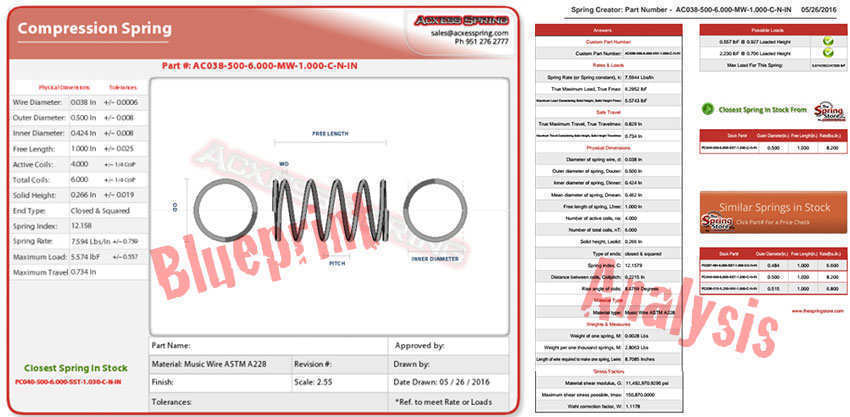
Along with the coil spring design blueprint and full spring analysis PDF is a custom quote of your coil spring based on several quantities. The quantities quote start at a minimum of 25 pieces all the way up to 25,000 pieces. If you wish to order more than 25,000 pieces, you may go ahead and request a quote by clicking on the assigned button to get a quote. The spring analysis will also provide you with stock coil compression spring suggestions in case you’re looking to order smaller quantities for testing purposes. Stock springs are also a lot more economical in these low quantities; you would just have to order enough to meet our $40 minimum order limit on The Spring Store.
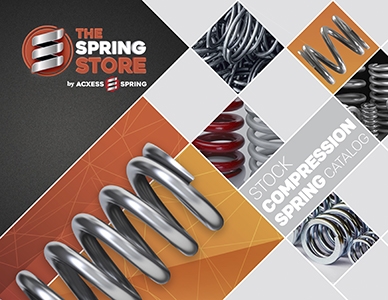
Download our coil spring catalog in PDF format to keep in your personal files in case you’re a regular spring user. Our catalog includes almost 70 trillion coil spring designs which are available off the shelf. The PDF catalog gives you a part number per spring design as well as all of its physical dimensions. Download it by clicking on the catalog cover to the right.
Enhance your projects with Spring Creator 5.0
Precision is crucial in spring design, and with Spring Creator 5.0, you can achieve it with ease. Our tool allows you to design different types of springs and offers advanced features such as instant quotes and real-time simulations with the Online Spring Force Tester. Register now and access all the benefits of our platform. Create the perfect spring and take your projects to the next level!

Created by Alfonso Jaramillo Jr
President Acxess Spring
Over 40 Years of Experience in Spring Engineering and Manufacturing
Coil Spring Design PDF: A Practical Guide to Acxess Spring’s 3D Blueprints
Attention! Input results shown will be +/- 10% from middle value. Hint: The closer your min and max inputs are, the more accurate your results will be!
Attention! Input results shown will be +/- 10% from middle value. Hint: The closer your min and max inputs are, the more accurate your results will be!
Attention! Input results shown will be +/- 10% from middle value. Hint: The closer your min and max inputs are, the more accurate your results will be!
What Is a Coil Spring Design PDF?
A Coil Spring Design PDF is a technical document that compiles all the essential information you need about a compression spring (or other spring type). Generated by Acxess Spring’s online spring calculator, Spring Creator, this PDF includes:
- A blueprint of your spring, depicting the wire diameter, number of coils, and end type.
- A full spring analysis, featuring parameters like spring rate (K), maximum travel, maximum safe load, and stress levels.
This document not only serves as a static record of your design but can also be a live blueprint because it references up-to-date calculations directly from Spring Creator. This ensures that every time you adjust any dimension or performance requirement, the PDF can be regenerated to reflect the latest data.
Why Is It Useful?
Whether you’re an engineer, purchaser, or DIY enthusiast, having a concise PDF that outlines every detail of your spring design saves time and minimizes guesswork. You can share the PDF instantly with colleagues or suppliers, request quotes for multiple quantities, and compare different designs side by side. This level of detail is critical when you need to verify mechanical compatibility, ensure safe performance, or keep thorough records for quality control.
Unpacking the 3D Custom or Stock Spring Blueprints
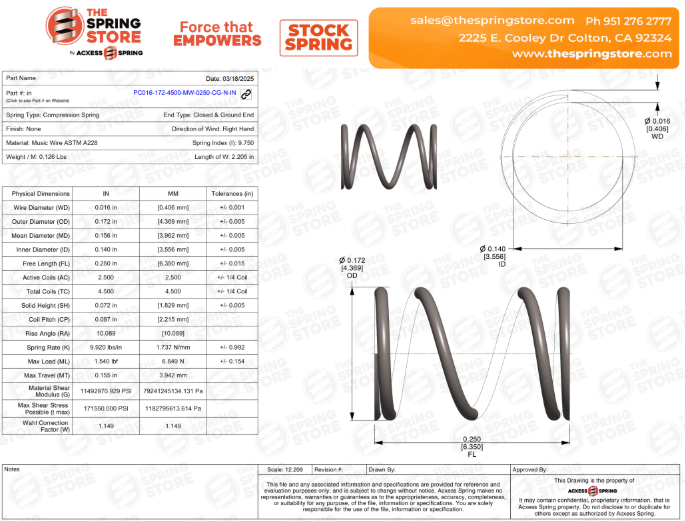
Acxess Spring’s 3D Blueprints for custom or stock springs are designed to give you a comprehensive, at-a-glance overview of everything you need to know about your spring. These documents contain several sections with clearly labeled terms and figures. Below, you’ll find each term explained briefly.
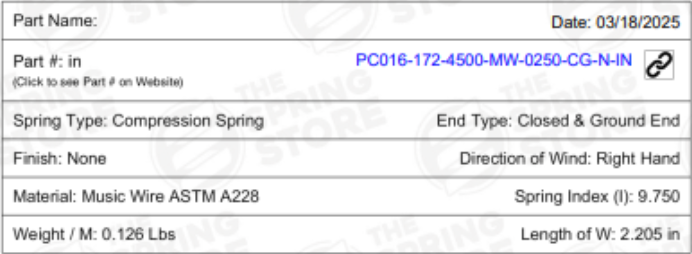
Basic Information
- Part Name
A specific name or identifier you assign to the spring. This makes it easier to recognize and reference in documentation and communication. - Date
The date the blueprint or document was created. Having the current date ensures you are always working with the most up-to-date design specifications. - Part Number (in inches)
A unique alphanumeric code (measured in inches) used to identify the specific spring design. This is critical for ordering, inventory management, and future reference. - Spring Type
Indicates what category of spring you’re dealing with (e.g., compression, extension, torsion, or conical). Knowing the type ensures you understand its basic function and load characteristics. - End Type
Describes how the ends of the spring are configured. Common end types for compression springs include closed and squared or closed and ground. Extension springs might have hooks. Torsion springs have legs. The end type affects how the spring interfaces with mating components. - Finish
Refers to any coating or surface treatment (e.g., zinc plating, black oxide) that helps with corrosion resistance or gives aesthetic appeal. - Direction of Wind
States whether the spring is wound in a right-hand or left-hand direction. This is especially important for springs that must rotate in a particular orientation or interface with threaded components. - Material
Specifies the metal or alloy used to manufacture the spring (e.g., stainless steel 302 ASTM A313, music wire ASTM A228, chrome silicon ASTM A401). Each material has different strengths, corrosion resistance properties, and costs. - Spring Index
A ratio comparing the mean diameter of the spring to its wire diameter (Index = MD ÷ WD). This metric gives an indication of potential stress levels and manufacturability. A low index often means higher stress, while a very high index can make the spring prone to buckling. - Weight
The overall weight of the spring in ounces or grams. Weight matters if you need to minimize mass (e.g., in aerospace or high-speed machinery).
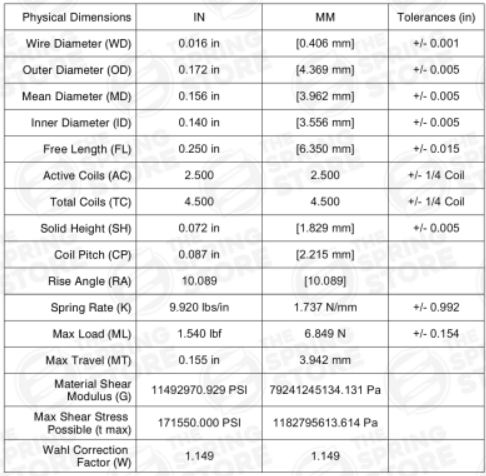
Physical Dimensions
This section details the precise measurements of your spring. Having exact figures ensures you can verify fit within an assembly and predict how the spring will behave under load.
- Wire Diameter (WD)
The thickness of the wire used to form the spring. A larger wire diameter generally increases load capacity but can reduce available deflection. - Outer Diameter (OD)
The diameter measured from one outer edge of the coil to the opposite outer edge. Ensures the spring can fit correctly into the designated space. - Mean Diameter (MD)
The average diameter of the spring coil, calculated by subtracting one wire diameter from the outer diameter. It’s a crucial dimension for stress and rate calculations.
- Inner Diameter (ID)
The diameter measured from one inner edge of the coil to the opposite inner edge, ensuring the spring can fit over any internal shaft or rod if necessary. - Free Length (FL)
The overall length of the spring when it’s not compressed or extended. This helps you understand how much space the spring will occupy at rest. - Active Coils (AC)
The number of coils that actually “work” when the spring is compressed or extended. This influences the spring’s flexibility and load capacity. - Total Coils (TC)
The total count of coils, including both active and inactive coils (e.g., closed coils at the ends for compression springs). - Solid Height (SH)
The length of the spring when all coils are fully compressed (i.e., coil bind). This dimension determines your maximum safe travel. - Spring Rate (K)
Also called spring constant or the stiffness of the spring, it indicates the amount of force required to compress (or extend) the spring by a specific distance (commonly measured in lbf/in or N/mm). - Max Load (ML)
The highest load the spring can safely handle without permanent set or damage. - Max Travel (MT)
The maximum safe deflection (compression or extension) before the spring risks permanent deformation or coil bind. - Material Shear Modulus (G)
A material constant that indicates how resistant the spring’s material is to shearing forces. - Max Shear Stress Possible (t max)
The maximum shear stress the material can withstand before failing. A critical safety indicator in spring design. - Wahl Correction Factor (W)
A correction factor used in stress calculations to account for curvature and stress concentration in the coils.
Additional Dimensions for Different Spring Types
- Extension Springs: Hook Lengths (HL), Hook Gaps (HG), Initial Tension (IT)
- Torsion Springs: Leg Length (LL), Free Position (FP), Rate per Degree, Max Torque
- Conical Springs: Small OD (SOD), Large OD (LOD), Average Rate (K), etc.
Visual Representation
Detailed diagrams and 3D views are provided to help you see exactly how the spring’s dimensions fit together:
- Wire Diameter (WD) Visualization
Shows the thickness of the wire, allowing you to confirm the scale. - Inner and Outer Diameter
Illustrates how the spring will fit around or inside other components. - Free Length
Depicts the spring at its full, uncompressed height, providing a clear visual for spacing considerations.
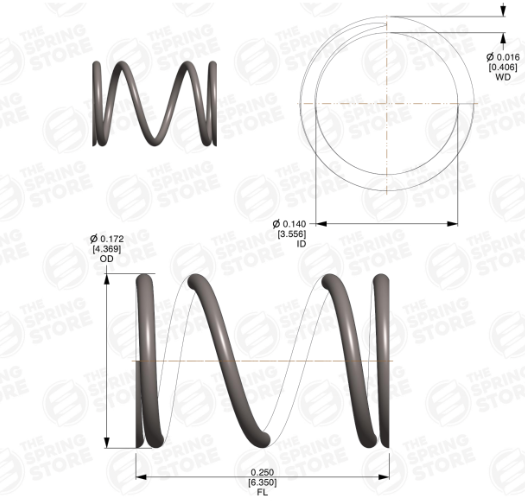
Seeing these dimensions in a visual format can prevent design miscalculations and misunderstandings—especially when multiple team members or suppliers need to collaborate on the same project.
Additional Information
This final portion of the blueprint provides optional sections for thorough documentation and traceability:
- Notes
A blank area where you can record any project-specific or part-specific comments. - Scale
Indicates the scaling used in drawings, ensuring everyone interprets the diagrams correctly. - Revision Number
Helps you track changes or updates to the design over time. - Drawn By / Approved By
Clearly shows who created the blueprint and who signed off on it, establishing accountability and quality control in the design process.

Step-by-Step: How to Generate Your Coil Spring Design PDF
While the 3D Blueprint approach offers an interactive and visually rich experience, many engineers still rely on a standard PDF for portability and reference. Here’s how you can create and download your spring PDF using Acxess Spring’s Spring Creator.
1.- Select Your Spring Type and Enter Basic Dimensions
Pick between compression, extension, torsion, or conical springs. At minimum, specify dimensions like outer diameter (OD) and free length (FL) so the spring fits your application.

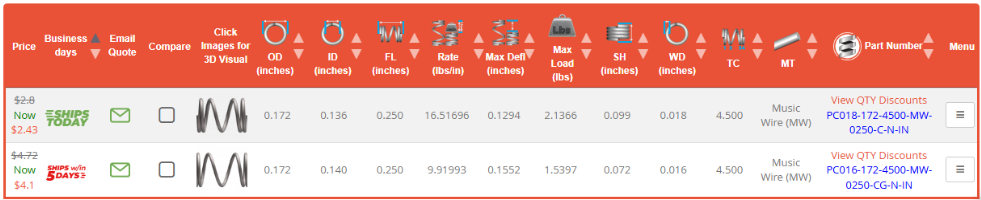
2.- Compare and Filter
Review the generated list of springs. Refine by additional specs (wire diameter, material, max load) to find your best match. In this case, we’re choosing Acxess Spring’s Part Number PC016-172-4500-MW-0250-CG-N-IN.
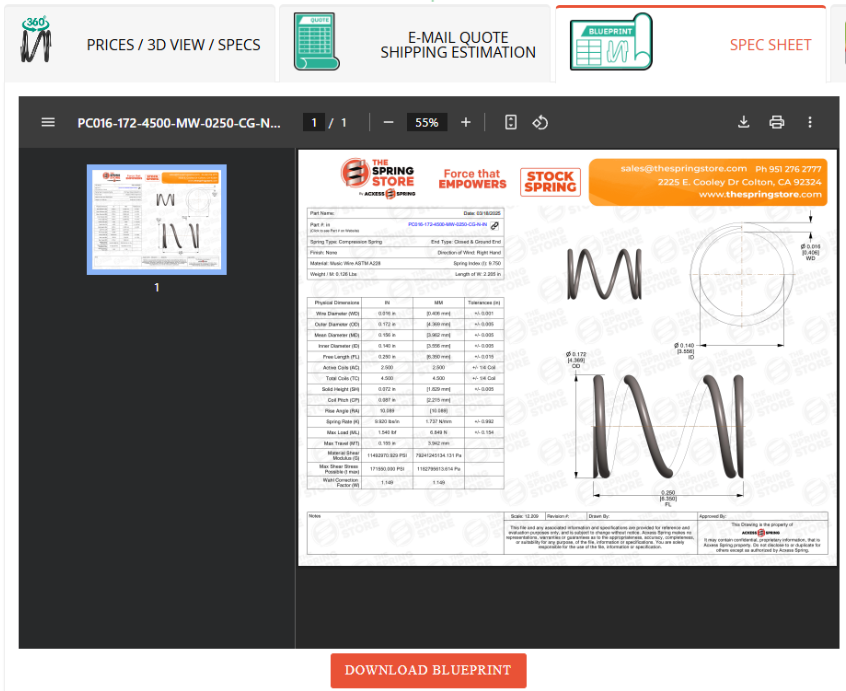
3.- Open the Spec Sheet
Once you’ve chosen a spring, click on the “Spec Sheet” tab to view its 3D blueprint.
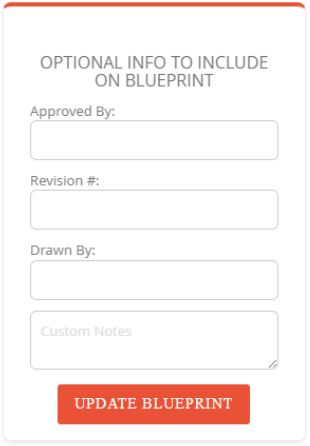
4.- (Optional) Add Details
Include extra info like “Drawn By,” “Approved By,” or a revision number for traceability.
5.- Download Your Blueprint
Save the final document with all specs and any additional details for manufacturing and reference.

This interactive process ensures you always have an up-to-date PDF reflecting the latest design modifications.
Leveraging Acxess Spring’s Massive Catalog
If you’re a regular spring user or simply want to keep a library of readily available designs, you can download Acxess Spring’s coil spring catalog in PDF format. This catalog features:
- Nearly 70 trillion coil spring designs, covering a broad spectrum of dimensions, spring types, and materials.
- Each design is identified by a unique part number, along with all its key characteristics.
Having this catalog on hand simplifies the search for a suitable spring and speeds up the design process, especially when you need to compare multiple part numbers quickly.
Elevate Your Spring Designs with Confidence
Coil spring design doesn’t have to be complicated—Acxess Spring’s Coil Spring Design PDF make the entire process faster, clearer, and more reliable:
- First, they compile every essential detail into a single, easy-to-reference document.
- Second, the 3D format offers a visually rich, interactive way to verify each dimension.
- Third, the Spring Creator tool simplifies calculations and updates, saving you valuable time.
- Fourth, the ability to quickly generate quotes and compare designs ensures you’ll always make the best choice for your project’s requirements.
- And finally, Acxess Spring’s extensive catalog—featuring nearly 70 trillion designs—makes it easy to find or customize the exact spring you need.
Ready to streamline your spring selection process? Leverage the power of Acxess Spring’s Blueprints and Spring Creator today to lock in precise data, collaborate effortlessly with team members or suppliers, and get high-quality springs that meet your exact specifications—all at the click of a button. Your next coil spring project can be simpler than ever before.
Enhance your projects with Spring Creator 5.0
Precision is crucial in spring design, and with Spring Creator 5.0, you can achieve it with ease. Our tool allows you to design different types of springs and offers advanced features such as instant quotes and real-time simulations with the Online Spring Force Tester. Register now and access all the benefits of our platform. Create the perfect spring and take your projects to the next level!
Created by Alfonso Jaramillo Jr
President Acxess Spring
Over 40 Years of Experience in Spring Engineering and Manufacturing